Basic 3D Realistic Character Art
A student friendly course built on 5+ years of teaching experience
This is not a regular course.
Think of it as a workflow reminder, and a reference you come back to.
🎯 8+ hours of raw, sped-up footage
🎧 No voice-over — listen to your own music
🧠 Built from 5+ years of teaching & production experience
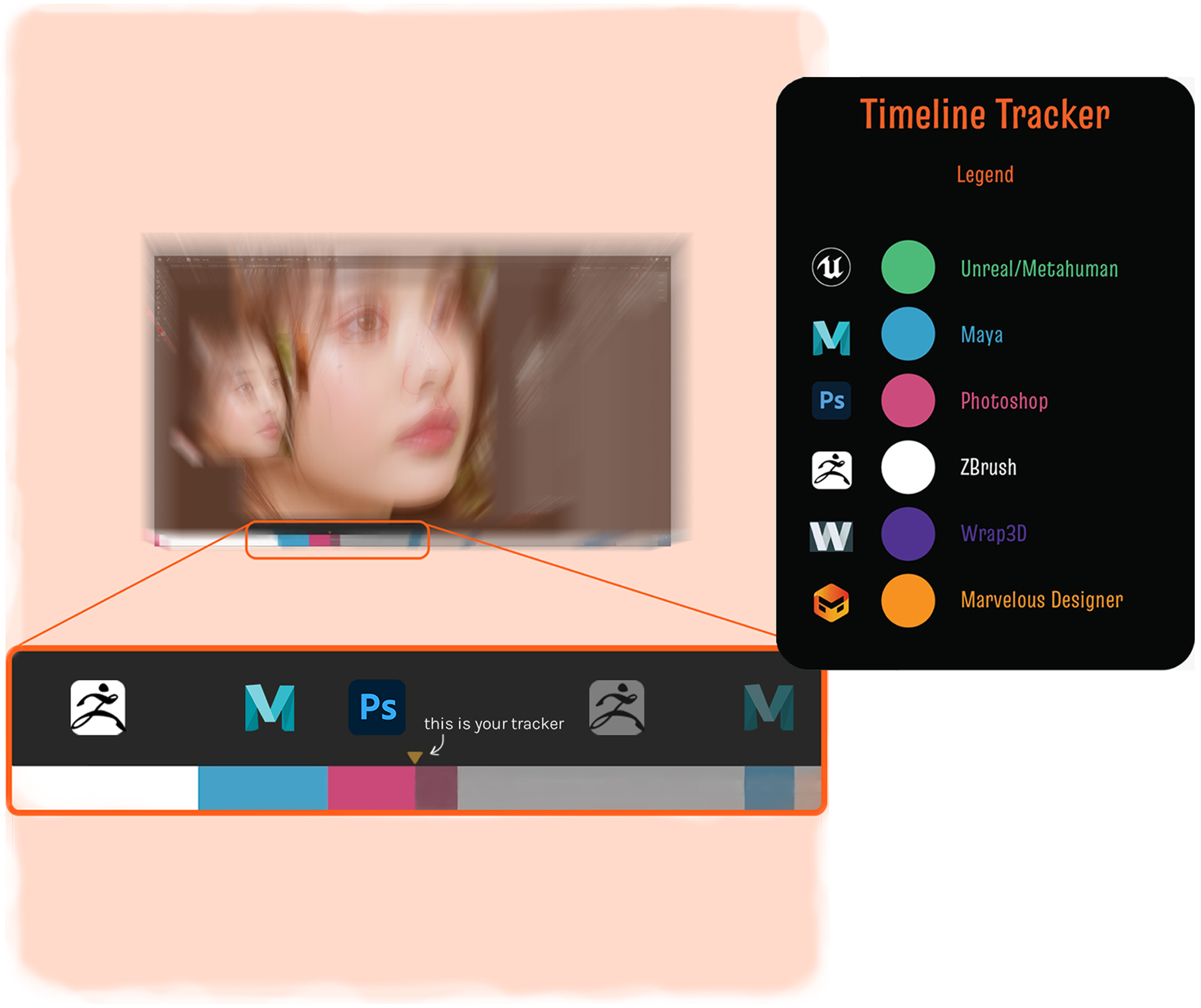
This course does not explain every click. It shows the real workflow, exactly how it happens in production. You'll watch the full process from project setup to final render, organized into chapters and episodes with a timeline tracker to help you follow progress.
The knowledge shared can be applied to both professional work and personal projects, both video game and movie projects. It includes: ZBrush, Marvelous Designer, Wrap3D, Maya, Xgen, Arnold, Photoshop, and Metahuman Creator.
what you will see
Sculpting & modeling
Likeness workflow
Clothes creation (Marvelous Designer)
Hair & facial grooming (XGen)
Texturing & shader
Rendering & look development (Arnold)
Bonus rigging & skinning
Final ''Cheat Sheet'' episode
course curriculum
CHAPTER 1 - PROJECT PREPARATIONS
e 001 - Metahuman to Maya
e 002 - Setting Up Maya
e 003 - Testing Render
CHAPTER 2 - LIKENESS
e 004 - Head Sculpting in ZBrush
e 005 - 'Rinse and Repeat'
e 006 - Body Sculpting in ZBrush
CHAPTER 3 - SCAN DATA
e 007 - Body Scan Data; PreWrap
e 008 - Wrapping the Scan Data
e 009 - Projecting the Scan Data; Cleaning and Resculpting
e 010 - Testing the Scan Data on Render
CHAPTER 4 - CLOTHES
e 011 - Marvelous Designer
e 012 - Preparing Clothes for Sculpting in ZBrush
e 013 - Dress WIP
e 014 - Boots and Collar WIP
CHAPTER 5 - SHADERS AND TEXTURING
e 015 - Eyes WIP
e 016 - Testing Materials
e 017 - Updating Skin Shader
e 018 - Updating Eyes' Shader, Updating Skin Albedo Texture
CHAPTER 6 - XGEN FACIAL GROOMING
e 019 - Xgen Eyebrows
e 020 - Xgen Eyelashes
CHAPTER 7 - IMPROVING CLOTHES
e 021 - Boots
e 022 - Dress
e 023 - Clothes LookDev
CHAPTER 8 - XGEN HAIR GROOMING
e 024a - Hair pt1
e 024b - Hair pt2
e 025 - Hairline
e 026 - Xgen Vellus and Final Xgen Touch ups
e 027 - Adding Background Canvas
CHAPTER 9 - BONUS RIGGING AND SKINNING
e 028 - Rigging with Advanced Skeleton
e 029 - Skinning Clothes Fix
e 030 - Preparing a Pose For Render Scene
e 031 - Deform Wrap and Blendshape Xgen meshes, Adding a Turntable
CHAPTER 10 - THE FINAL
e 032 - The Cheat Sheet
What you will get
✅ 8+ hours of sped-up raw footage structured in episodes
✅ Episodes can be slowed down anytime
✅ Lifetime access
✅ Private Discord channel for WIPs & feedback
✅ Access to support files (ZBrush config, Maya camera, cheat sheet, etc.)
What you will learn
✅ Next gen workflow that includes Metahuman pipeline
✅ How much time to realistically spend in each software
✅ Tips and tricks used in real projects
Who this course is for
✅ Artists tired of long, slow tutorials
✅ Artists and students who already know the basics of 3D
✅ Artists that want to master the Metahuman pipeline
✅ Artists interested in either video game or movie character art
✅ Anyone who wants a clean, simplified pipeline
What you will NOT get
❌ Voice-overs or explanations
❌ Software licenses
❌ Scan data
❌ 1-on-1 mentorship
What you will NOT learn
❌ Unreal Engine lookdevelopment
❌ How to sculpt
❌ Mari nor Substance Painter
This course is not NOT for you if
❌ You want anatomy explained
❌ You need step-by-step voice guidance
❌ You want a beginner level teaching course
❌ You expect a job guarantee
❌ You've never used ZBrush or Maya
FAQs
Who is this course for?
For junior and intermediate artists, as well as advanced artists who want to refresh their knowledge of the production pipeline. Not recommended for complete beginners.
Is there a student discount?
Yes, there is! The discount I am giving is 30% off the main price, and it's given to particular students as they are;
1. My current or ex students
2. Current or ex TTTC/TTO students (Think Tank)
3. All current students (any university) from Croatia/Serbia/BiH/Slovenia
If you find yourself among the mentioned, please contact me!
Episodes are too fast — what should I do?
Slow them down. Rewatch sections. This course is designed for repetition, not first-time understanding.
Do I need anatomy knowledge?
Yes — basic anatomy knowledge is expected.
How long did the character take to create?
It took me about 40 hours!
Will this guarantee me a job?
No. But it will help you build stronger, more realistic portfolio pieces.
What's the timeline tracker?
It's a custom made timeline tracker located in each episode at the bottom of the screen to help you keep a more precise view of work in progress. It shows which software I'm working in and how much time I spend in each one. It might help you to build your awareness of where my time is actually spent, but also to get rid of the fear of switching between different software.
How much time per week should I realistically invest to keep up with the course?
It highly depends on the artist and how much they are lacking knowledge in certain areas. I would say around 5-10 hours per week if you plan to complete your project within 8-12 weeks.
What are the requirements?
Access to the required software, and a computer capable of running them.
Additionally, it’s highly recommended to get a light setup from Cave Academy and skin detail data from 3D Scan Store. One file from each is sufficient (1 scan + 1 light setup).
What version of Maya are you using?
As you will be able to see in the course, I am mainly using 2023 Maya. The 2023 version is the one I found most stable when a scene includes Xgen
How do I learn sculpting?
Observation is the only true skill when it come to sculpting; how to notice. The best advice I can give you is get yourself as much nice scan data as you possibly can afford, open them up in software as ZBrush, and just observe.
get started today!
Whether you're building a career or refining your workflow, this course shows the full process
— from start to finish.